
Module 1: Introduction to Quanifi
Welcome to Quanifi! In this guide, you will learn the mental model of quantum software engineering, understand how Apache NiFi orchestrates quantum dataflows, and explore your first live pipeline.
1. The Software Engineer's Mental Model of Quantum Computing
You do not need a degree in quantum mechanics to program quantum computers. Think of quantum computing through standard linear algebra and probability:
Classical Bit: A variable restricted to 0 or 1.
Qubit: A 2-element normalized vector holding two complex numbers called probability amplitudes:
$$\vert\psi\rangle = \alpha \vert 0\rangle + \beta \vert 1\rangle = \begin{pmatrix} \alpha \\ \beta \end{pmatrix}$$
where $|\alpha|^2 + |\beta|^2 = 1$. The quantity $|\alpha|^2$ is simply the probability of reading out a 0, and $|\beta|^2$ is the probability of reading out a 1.
Here are the 4 fundamental concepts software developers need:
- Superposition: A qubit is not "both 0 and 1 at the same time" in a mystical sense; rather, it stores a continuous probability distribution across possible bit combinations. For $n$ qubits, the vector has $2^n$ amplitudes.
-
Quantum Gates: Gates are simply reversible linear transformations (unitary matrices). For example, the Hadamard ($H$) gate turns a definite
0into a 50/50 balanced probability coin: $$H \vert 0\rangle = \frac{1}{\sqrt{2}} \vert 0\rangle + \frac{1}{\sqrt{2}} \vert 1\rangle = \vert+\rangle$$ - Interference: Amplitudes can be positive, negative, or complex. When we combine paths, negative amplitudes cancel out positive ones (destructive interference), while matching amplitudes reinforce each other (constructive interference). Quantum algorithms work by steering wrong answers toward zero probability and right answers toward 100% probability.
- Measurement: Measuring a register collapses the state vector, sampling one classical string with probability proportional to its squared amplitude. To estimate probabilities, we run the circuit multiple times (each run is called a shot, typically 1024 or 4096 shots).
2. What is Quanifi?
Quanifi (Quantum NiFi) is an open-source platform that brings Flow-Based Programming (FBP) to quantum software development. Instead of writing monolithic Python scripts that call SDKs directly, Quanifi breaks quantum workflows into modular, reusable blocks managed by Apache NiFi.
The 3 Core Concepts of Quanifi:
-
1FlowFiles (Data Envelopes)
In NiFi, every data packet moving through the canvas is called a FlowFile. A FlowFile has two parts:
- Content: The binary or text payload (e.g. OpenQASM 2.0 / 3.0 circuit text, QPY byte streams, or JSON result dictionaries).
- Attributes: Key-value metadata headers attached to the payload (e.g.
circuit.format=qasm2,circuit.num_qubits=4,sim.shots=1024,sim.top_result=100).
-
2Processors (Black-Box Workers)
Processors are self-contained executable components written in Python or Java. They read incoming FlowFiles, perform a specific task (such as constructing an oracle, running a Grover step, transpiling for IBM hardware, or recording execution latency), and output new or enriched FlowFiles.
-
3Connections & Queues
Processors are connected via directed edges with bounded FIFO queues. NiFi handles backpressure, retries, and failure routing automatically. If an IBM quantum processor queue is congested, NiFi automatically holds upstream jobs without dropping data.
3. The Wire Contract: How Data Moves Between Frameworks
In multi-vendor quantum computing, interoperability is the holy grail. One processor might assemble a circuit using Qrisp, while the downstream simulator runs Qiskit Aer, and a comparison node checks against Cirq.
Quanifi achieves zero-lock-in by enforcing standardized wire contracts over OpenQASM:
| Attribute Key | Sample Value | Purpose |
|---|---|---|
circuit.format |
qasm2 or qasm3 |
Identifies serialization dialect of the payload. |
circuit.num_qubits |
4 |
Total qubit allocation of the circuit. |
circuit.framework |
qrisp / qiskit / cirq |
Framework that originally generated the circuit. |
sim.shots |
1024 |
Total execution shots requested for sampling. |
sim.top_result |
1011 |
The most frequently measured bitstring. |
sim.top_probability |
1.0000 |
Empirical probability of the top measurement result. |
4. Hands-on Tour of the NiFi Canvas
Let's look at the actual NiFi web interface:
-
Ensure Docker is running: Run
docker compose up -din your terminal and verify health withdocker compose ps. - Open NiFi in your browser: Navigate to https://localhost:8443/nifi (accept the self-signed TLS certificate).
-
Log in with credentials: Username:
admin, Password:quanifipassword. -
Open a process group: Double-click on the process group named
Qrisp Components & Textbook Algorithms.
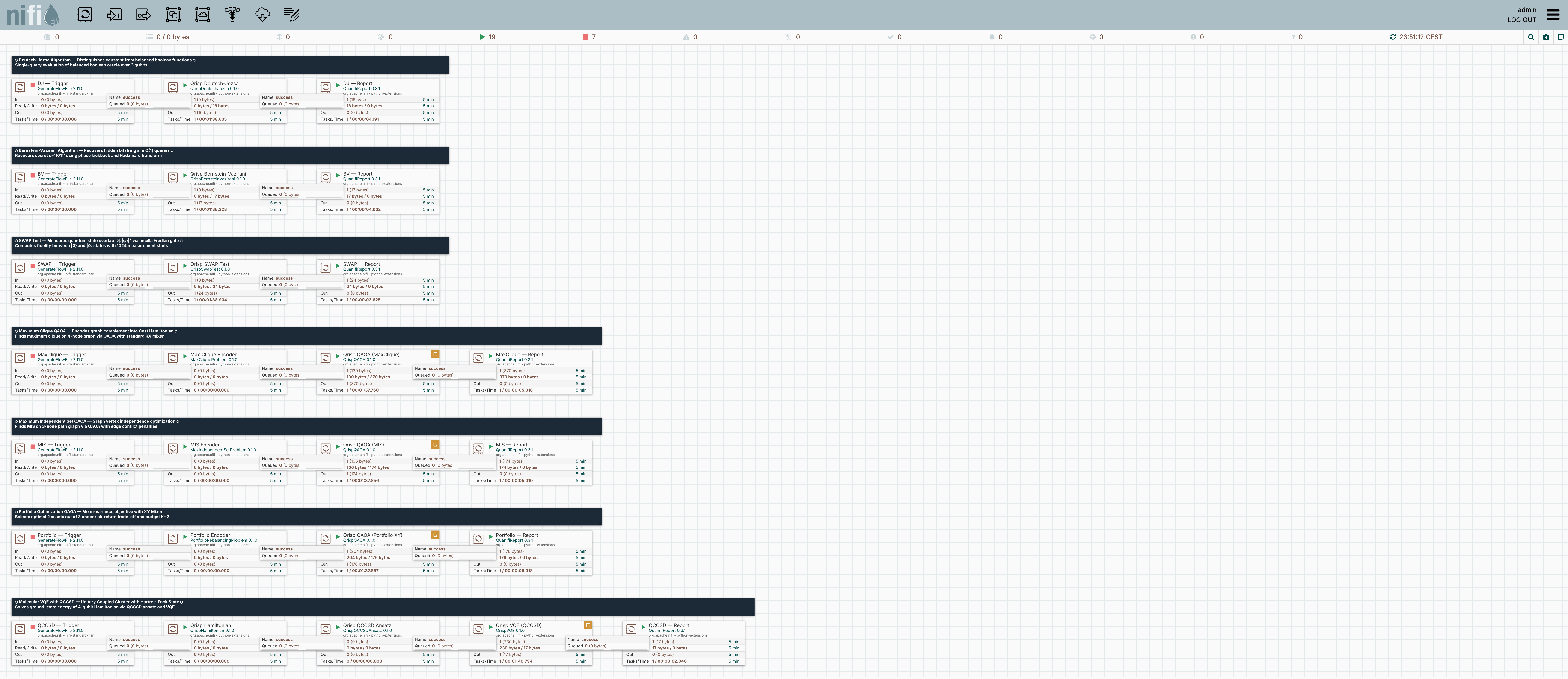
Notice the icons on the top-left of each processor box:
- ▶ (Green Play): The processor is Running and actively listening for incoming FlowFiles in its input queue.
- ⏹ (Red/Orange Square): The processor is Stopped. FlowFiles will accumulate in its input queue until it starts.
- ✔ (Green Checkmark): The processor configuration is Valid and ready to execute.
- ⚠ (Yellow Warning / Triangle): The processor has validation errors (e.g. missing required properties or unconnected relationships).
Exploring Processor Properties and Queues
In this exercise, you will practice inspecting a processor's configuration and finding where output reports land.
Tasks:
- In the NiFi canvas (https://localhost:8443/nifi), locate the
DJ — Triggerprocessor. - Right-click on
DJ — Triggerand select Configure (or double click it). - Go to the PROPERTIES tab. What is the value of Batch Size?
- Next, look at the terminal processor in that pipeline:
DJ — Report. What is the property value for Flow Name? - Where does
DJ — Reportsave the generated HTML reports on the host filesystem?
👉 Click to Reveal Exercise Solution & Explanation
Solution:
- Batch Size: Set to
1. This means each execution cycle produces exactly 1 FlowFile (a single test event). - Flow Name: Set to
qrisp-deutsch-jozsa. - Reports Directory: The property
Reports Directorypoints toreports. When the flow executes, it writes the HTML report card to:
You can open this HTML file directly in any web browser to view the executed circuit diagram, execution time, and output probability distribution!reports/qrisp-deutsch-jozsa.html